
First sequence
Build a multichannel sequence, load leads without sending anything, then launch it behind a preview and a spend cap.
A sequence is one journey per lead, mixing email, LinkedIn, WhatsApp, rep call tasks, and CRM tasks. Building it and enrolling leads spends nothing and sends nothing; only starting it dispatches.
Attach a sender first
Sidebar → Sequencer → Accounts (/sequencer/accounts). Tabs: Senders, LinkedIn, Email, WhatsApp, Phone numbers.
- Email tab → Add inboxes
- LinkedIn tab → Connect LinkedIn account
- Senders tab → New sender — one person's inboxes plus their LinkedIn and WhatsApp accounts as one sending identity.
oxygen senders list --json and oxygen mailboxes list --json show what is connected. oxygen senders connect --country DE --acknowledge-risk mints a shareable hosted-auth link, valid 10 minutes; --country is the account owner's normal LinkedIn login country, not your target market. --acknowledge-risk records that LinkedIn restricts automated activity and that pacing reduces but does not remove the risk.
Build it in the app
Sidebar → Sequencer (/sequencer) → New sequence opens /sequencer/sequences/<id>: an empty draft with four stages — Leads → Sequence → Senders → Launch. The Next: … button at the bottom moves through them.
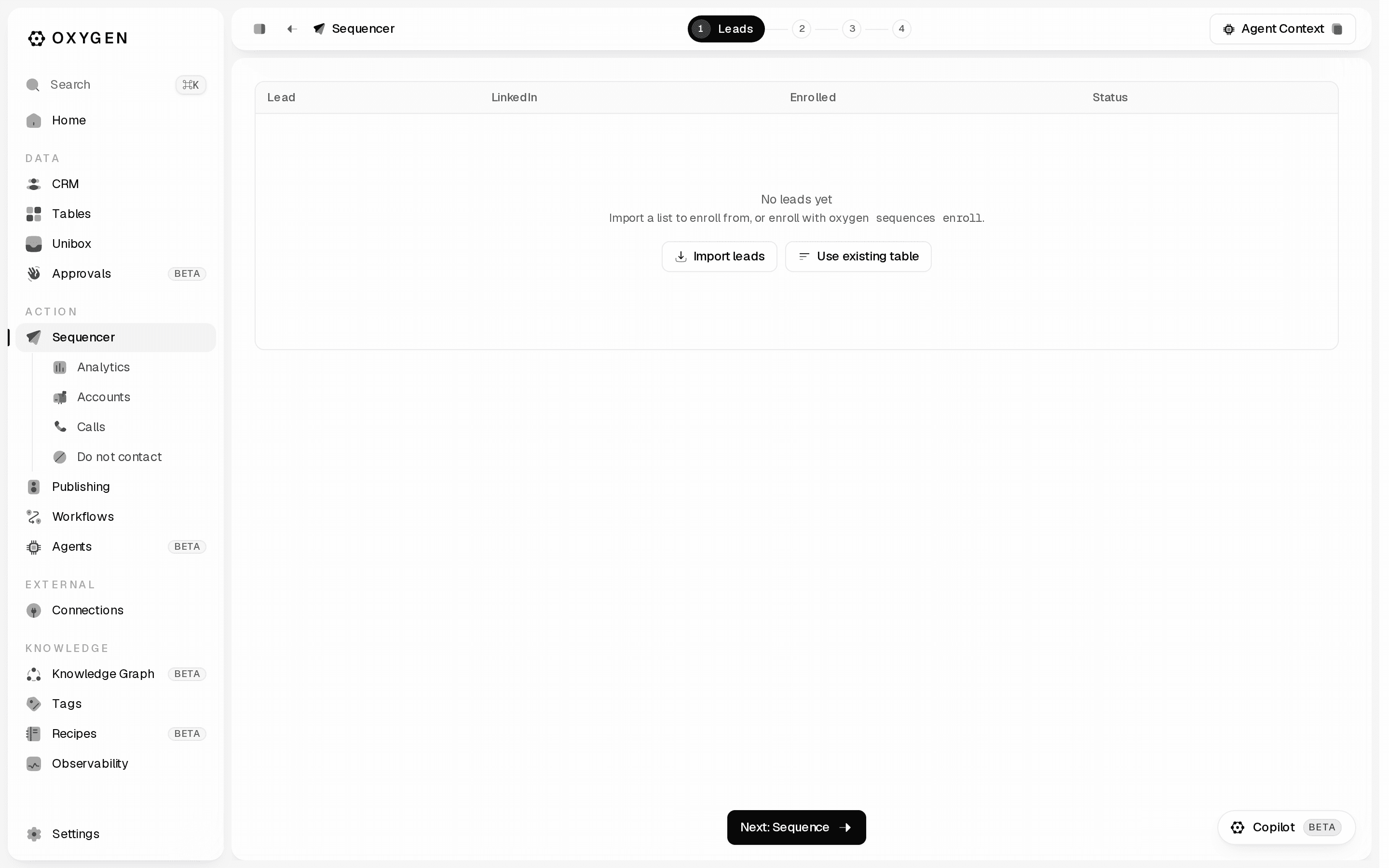
Leads. Import leads offers Upload a file (CSV, JSON, JSONL, or XLSX), Copy from a table, or HubSpot list. Imported rows are deduped and enrolled automatically — there is no separate enroll button. On the toast N leads imported but not enrolled — no LinkedIn URL, open Identifiers beside the import button, map the LinkedIn column, and re-import.
Sequence. The canvas opens on Sequence start. Click the + between steps ("Add a step") and pick from the catalogue: Send email, Reply email, Send invite, Send message, Send InMail, WhatsApp message, Call task, Create CRM task, Wait, Wait for signal, Branch on signal or data. Copy fields interpolate {{column}} from the lead's row; use {{column|fallback}} where a value may be missing.
Senders. Add senders chooses who this sequence sends from.
With several senders, Oxygen gives each lead one of those people: its LinkedIn steps come from that person's account and its emails from one of their inboxes, even while that account or inbox is at a limit or needs reconnection. To send one step from someone specific, open the step → Advanced → From. On a Send email step you pick an exact inbox, and a change of From starts a new email thread, so give that step a subject. On a LinkedIn connection or message step, the person you pick sends every lead's connection request and messages (LinkedIn allows one of your accounts per conversation), while email still comes from each lead's own person. A profile visit, follow, like or comment can each come from anyone. The launch review lists the sender of every step.
Launch. Sending schedule (timezone, days, From/To) and Sending settings: Emails per day / Sends per day across every sender, blank for no limit, reset at UTC midnight. Profile views and other reads don't count.
Build it from the CLI
oxygen sequences create --name "Q3 founders" --slug q3-founders \
  --steps-file ./steps.json --table <table-id> --json
steps.json holds { "steps": [...] }, each step with its own id:
{
  "steps": [
    { "id": "s1", "channel": "email", "kind": "email_send",
      "subject_template": "{{company}} + inbound",
      "body_template": "Hi {{first_name|there}} — quick question." },
    { "id": "s2", "kind": "wait", "days": 3 },
    { "id": "s3", "channel": "email", "kind": "email_send",
      "body_template": "Bumping this once, {{first_name}}." }
  ]
}
s3 has no subject_template, so it continues the lead's previous email: it goes out as Re: <s1's subject> inside that thread, like a reply. Give a step its own subject_template to start a new email instead. The first email step always needs one.
For an exact sender on one email, set sender_mailbox_id to that inbox's ID on that email_send step and give it a subject_template. For a LinkedIn step, set sender_profile_id to a selected sender profile's ID; on invite, message, inmail and withdraw_invite it must be the same on all of them (or absent). Select people with --sender-profiles <profile-ids> when creating or updating the sequence. oxygen sequences start <sequence> previews sender_journey before anything sends: every email and LinkedIn step with its sender, and for default steps the people a lead can be assigned. Contacts shows the lead's Sender and the Last email From separately; sequence analytics groups actual sends and attributed replies by inbox and step.
Enrolling is inert — no provider call, no credits, no message:
oxygen sequences enroll q3-founders --from-table --json--from-table takes up to 500 not-yet-enrolled rows per run; re-run while from_table.has_more is true. For leads outside the bound table, pass --leads-file with { "leads": [{ "row_values": { "email": "…" }, "lead_name": "…" }] }. Attach senders with oxygen sequences update q3-founders --senders <ids>.
Set the do-not-contact list before launching
Sidebar → Sequencer → Do not contact (/sequencer/do-not-contact). Add entries takes pasted people, emails, phones, or company identities; Sync HubSpot pulls in a saved list. Enrollment always enforces this list.
oxygen suppressions add --lead <linkedin-provider-id> --reason manual
oxygen suppressions import --file ./dnc.txt --reason manual
oxygen suppressions addresses --json
import takes a mixed file of emails, bare domains, and LinkedIn URLs, up to 5000 entries. --reason is required when the file contains any domain — a domain block silences everyone at that company.
Launch
No flags means preview only: it activates nothing and sends nothing.
oxygen sequences start q3-founders --jsonRead launch_readiness.blockers, copy_preview (exact rendered samples per lead), and the estimated credits.
--dry-run activates the sequence in simulated mode: every step advances, with no provider call, CRM write, or credit.
oxygen sequences start q3-founders --dry-run --jsonThis command sends real messages to real people.
oxygen sequences start q3-founders --approved --max-live-sends 200 --max-credits 5000 --json--max-live-sends is a positive-integer ceiling on real external actions, required for any sequence with email, WhatsApp, or CRM-task steps — those cost 0 Oxygen credits, so --max-credits cannot bound them. Omitting it fails with sequence_send_cap_required. --max-credits bounds the LinkedIn track and is optional — omit it for an unbounded run. Every per-action LinkedIn charge is 0 credits today (pricing reference).
In the app the same gate is Review & start on the Launch stage: a dialog listing pending enrollments, estimated credits, rendered copy samples, and any blockers. Start live confirms, and stays disabled while a blocker is listed.
It is hidden until the draft has at least one step and — for LinkedIn or WhatsApp — at least one sender; the CLI reports these as sequence_no_steps and sequence_no_senders.
Watch it, pause it, or retire it
A reply stops that lead's enrollment automatically, on every channel — nothing to configure. To pause the replier's colleagues too, create the sequence with --company-reply-pause default (freemail domains are never company-matched); oxygen sequences paused-companies lists what is paused and oxygen sequences resume-company resumes it. To pause a company yourself — say, after a meeting is booked — run oxygen sequences pause-company --domain acme.com.
| What you want | Where |
|---|---|
| Funnel: enrolled, sent, replied, reply rate | oxygen sequences stats q3-founders --json, or Analytics → Outreach (/analytics/outreach) |
| Every send, failure, deferral, open, click, reply, bounce | oxygen sequences events q3-founders --limit 50 --json |
| Per-lead state and the last error | oxygen sequences enrollments q3-founders --json |
| The replies themselves | Unibox (/unibox) |
oxygen sequences pause q3-founders stops new dispatches without deleting the campaign; oxygen sequences resume q3-founders restarts them, and enrollments pick up where they left off. In the app: Pause while active, Resume live while paused.
To retire the Sequence permanently, preview the exact blast radius first, then approve that same deletion:
oxygen sequences delete q3-founders --json
oxygen sequences delete q3-founders --approved --json
The current CLI does not create new archived Sequences. Legacy archived rows remain readable and taggable, but new retirement uses pause for a reversible stop or the preview-first delete flow above for permanent removal.