Limited offer50% off your first month on every plan from $9924 hours onlySee plans

OXYGENvsDripify

Oxygen vs Dripify Dripify bills $79 a seat per LinkedIn account. Oxygen runs a team on one plan.

Oxygen runs LinkedIn and email from one sequence, with lead data, a CRM, workflows and one inbox for every reply, on one plan from $49 a month. Dripify is a cloud LinkedIn tool that adds email from one mailbox per seat; it leads on sender safety, with a dedicated IP per account, and ties on post signals and email finding.

Used by B2B GTM teams at

  • Sympower
  • SignalFisher
  • Flino
  • FIOR
  • Grasp
  • Growth Alliance
  • Atticus

Oxygen vs Dripify: the short answer

Choose OXYGEN if

  • You want LinkedIn and email replies in one inbox; Dripify keeps email replies in your Gmail or Outlook mailbox.
  • You have 3 people on email and LinkedIn: $118.50 a month on Oxygen against $237 for 3 Dripify Pro seats.
  • You want warm-up, inboxes at $4 a month and placement tests; Dripify leaves warm-up to you and sends from one mailbox per seat.
  • You want deals and a pipeline next to your outreach; Dripify keeps leads as people with notes and tags, with no deals.

Choose Dripify if

  • You want a dedicated IP in your region for every LinkedIn account, with daily limits and Activity Control watching each one.
  • You prospect people who like or comment on competitors' LinkedIn posts and want new ones added every 12 hours on Advanced.
Best fit by team
TeamPickWhy
A founder on LinkedIn and emailOXYGEN$49 a month with a CRM and one inbox; Dripify Pro is $79 a month for one seat.
A sales team of 3 on email and LinkedInOXYGEN$118.50 a month against $237 for 3 Dripify Pro seats, with replies from both channels in one inbox.
A team on email onlyOXYGENDripify's pages show one mailbox per seat, each with a LinkedIn account; Oxygen sends from many inboxes on the $49 plan.
An agency focused on LinkedIn account safetyDripifyA dedicated IP per account and Activity Control on every client's sender, with a team per client.

Why switch from Dripify to Oxygen

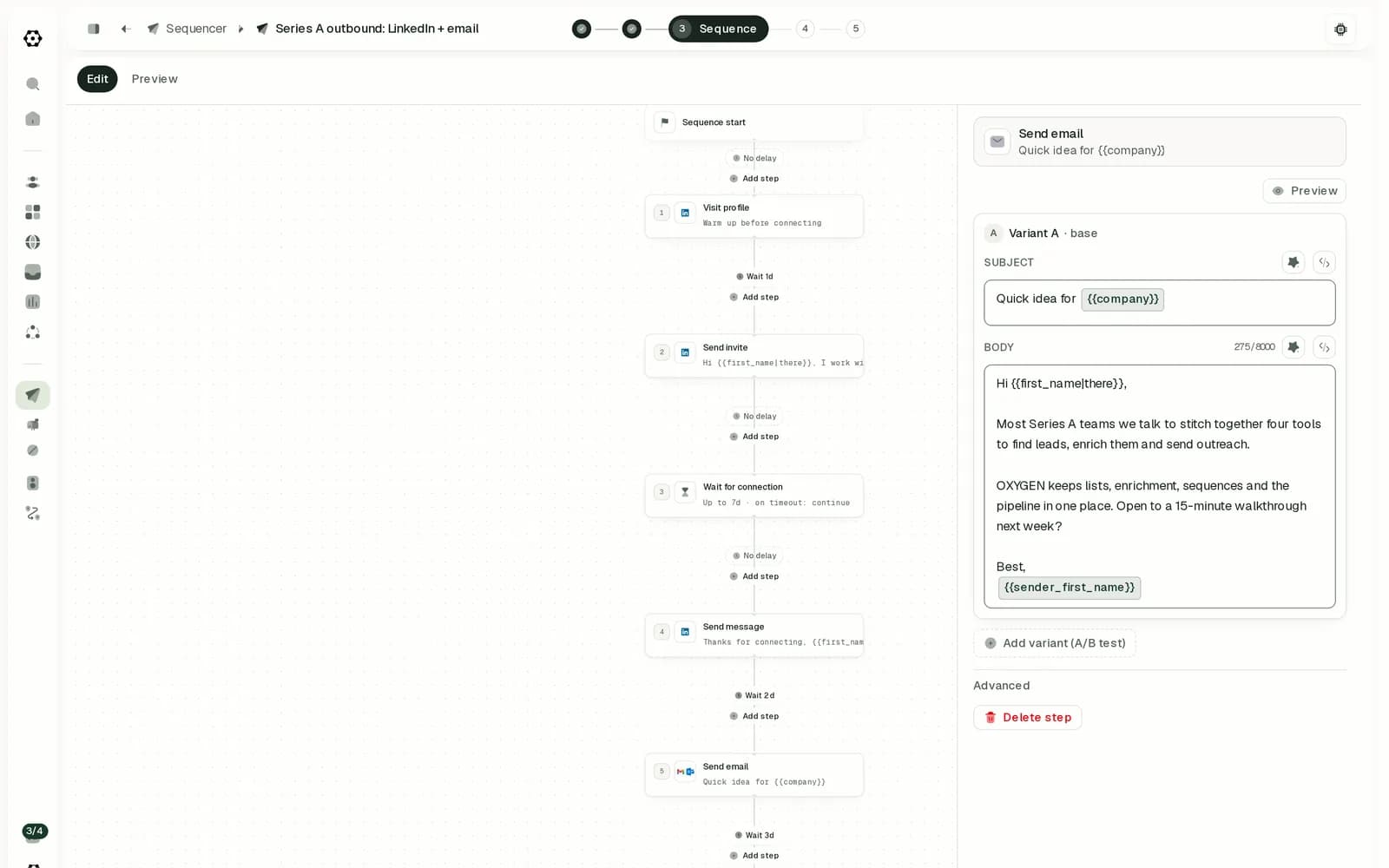
An Oxygen sequence that visits a LinkedIn profile, sends an invite, waits for the connection, sends a message and then an email

Email replies are not in the Dripify inbox

Dripify's Smart Inbox shows LinkedIn conversations; replies to its emails stay in the connected Gmail or Outlook mailbox, and a unified email inbox is listed as coming soon. Oxygen puts email, LinkedIn and WhatsApp replies in one inbox with AI triage.

Sequences and inbox in detail

Warm-up and inboxes are left to the user

Dripify's help asks users to warm up a new inbox by sending genuine emails by hand, and it sends from one connected Gmail or Outlook mailbox. Oxygen includes warm-up, sells Google and Microsoft inboxes at $4 a month and runs placement tests.

Email deliverability in detail

Every rep is a separate seat

Dripify prices each user at $79 a month on Pro, with one LinkedIn account per seat, so 3 people cost $237. Oxygen is one plan per workspace: 3 people on email and LinkedIn cost $118.50 a month.

Pricing model in detail
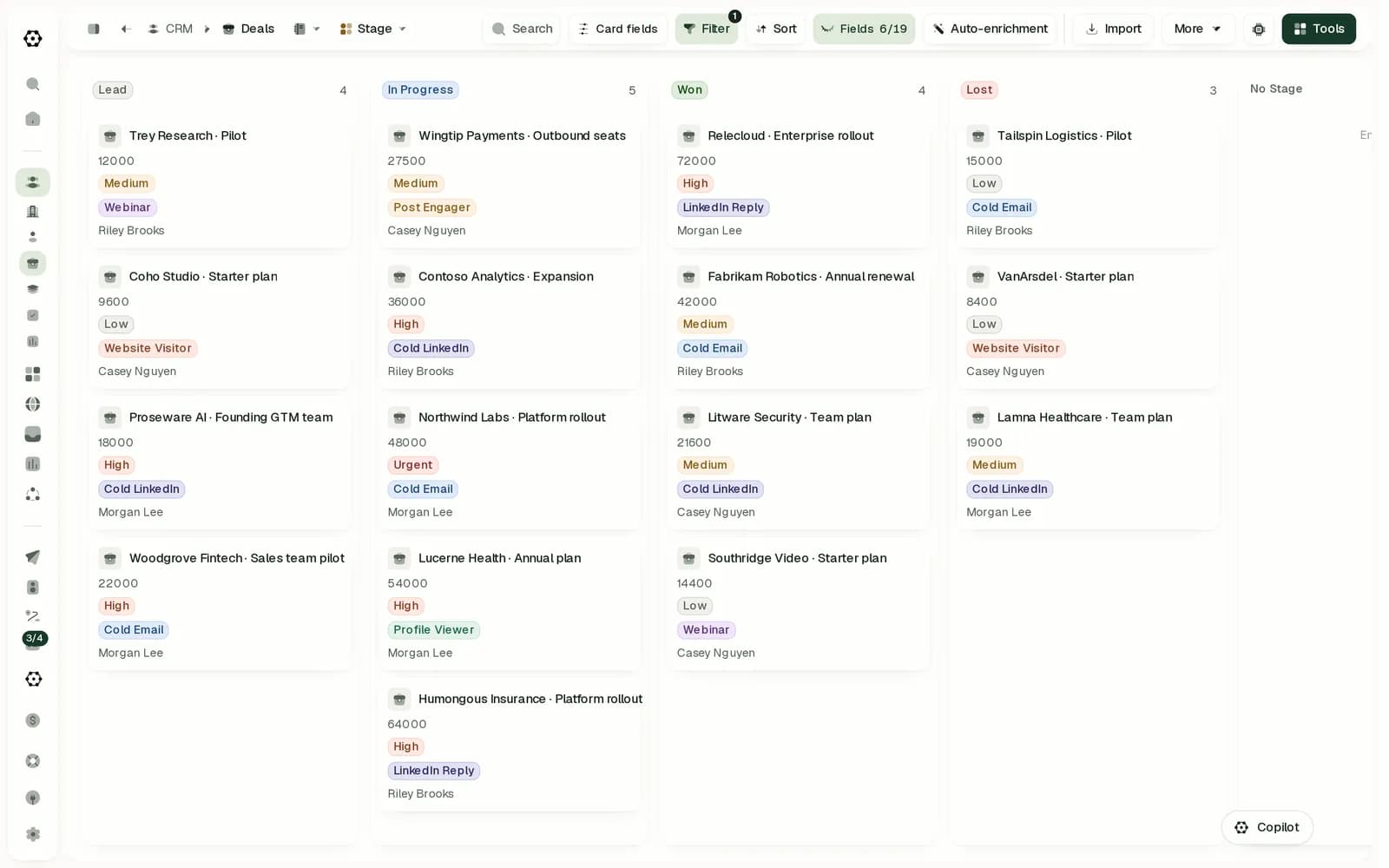
The Oxygen deals board with deals in Lead, In Progress, Won and Lost

Leads have no deals or pipeline

Dripify keeps leads as people with notes, tags and an activity log, with no company records, deals or pipeline found, and its HubSpot sync is in beta. Oxygen's CRM holds companies, people and deals on a pipeline, free on every plan.

Built-in CRM in detail

Oxygen vs Dripify at a glance

Oxygen and Dripify compared on 13 criteria
CriterionOXYGENDripify
Lead data and signals
Lead data from multiple vendorsHow many providers the email waterfall tries on the vendor's credits, and how lookups are billed.Email and phone waterfalls across 17 and 13 providers, charged only when one finds the value, on plan credits or your own keys from the $99 plan. EvenAn Email Finder on every paid plan with 100 credits a month, charged only when it finds and verifies an email; packs from $29 for 1,000. Providers are not named, phones come only from LinkedIn profiles, and no own keys found. Even
SignalsWhich buying signals it captures, what they cost, and whether one can start outreach.LinkedIn profile viewers, new followers and post reactions from your connected accounts at no extra cost, plus hiring, funding, news, tech-stack and job-change searches on credits. A signal can start a workflow or enroll the lead in a sequence. EvenOn Advanced, Evergreen watches any public LinkedIn post, competitors' included, for new likes and comments every 12 hours, and a Sales Navigator search weekly, adding new matches to the campaign. No job-change, funding or hiring signals. Even
Email, LinkedIn and more channels
Email deliverabilityWarm-up, inbox buying, placement tests, rotation, send limits, bounce protection, then the price of an inbox.Google Workspace and Microsoft 365 inboxes at $4 a month with warm-up included, or a Microsoft tenant at $40 a month for up to 100 inboxes. Placement tests from $1 an inbox a month, inbox rotation, daily limits per mailbox and a bounce auto-pause. AheadSends from one connected Gmail or Outlook mailbox, up to 200 emails a day with limits you set. Found emails are verified first and a bounced address gets no more email. Warm-up is manual; no inbox buying, placement tests or rotation.
LinkedIn automationWhich steps run on their own, how the account connects, and what 2 senders cost a month.Runs in the cloud with no browser extension: visits, invites, messages, InMail, follows, likes and comments. $34 a month per connected account, every action included. AheadRuns in the cloud with a dedicated IP per account: invites, messages, Sales Navigator InMail, profile views, endorsements, follows and likes. One LinkedIn account per seat at $79 a month on Pro, so 2 senders cost $158.
Sequences and inboxMixed channels, branches, A/B tests, reply stops on every channel, one inbox, AI replies.One sequence mixes email, LinkedIn, WhatsApp and call tasks, branches on connection state, signals or lead data, tests up to 26 versions of a step, and stops a lead when they reply on any channel. Replies land in one inbox with AI triage and drafted answers. AheadLinkedIn and email in one sequence with conditions, A/B tests in beta on Advanced and a pause when a lead replies on LinkedIn or by email. The inbox holds LinkedIn chats only; email replies stay in the mailbox. No AI reply drafts found.
LinkedIn at scaleMany senders on one campaign: rotation, limits per account, a proxy per account and the price per sender at volume.Selecting several senders in a sequence rotates new leads across them, one person per lead, with daily and weekly limits per account. Each account is $34 a month at any volume, with no proxy included.One LinkedIn account per seat with a dedicated IP each, daily limits per account (75 invites a day), Activity Control on Advanced and team-wide lead deduplication. Volume discounts for 10+ seats go through sales. No sender rotation found. Ahead
LinkedIn content publishingScheduling posts, approving them before they go out, and reading their analytics.Schedule LinkedIn and X posts, approve each before it goes out, and read LinkedIn and X analytics. AheadNo post scheduling, approvals or post analytics found; LinkedIn posts are a lead source, where it collects the people who liked or commented.
CRM and integrations
Built-in CRMDeals, a pipeline and custom records in the same workspace, and what they cost.Companies, people, deals and objects you define, a deals pipeline, and an activity timeline where replies land. Free on every plan, the free one included. AheadA lead CRM on every plan: people with notes, tags, custom fields and an activity log that records replies. No company records, deals, pipeline or custom objects found.
Works with your stackWhich CRMs sync both ways. Push-only syncs and imports do not count.Two-way sync with HubSpot, one-way sync to Attio and an import from Pipedrive. No Salesforce sync. Pushes leads into Instantly, Smartlead, lemlist and HeyReach campaigns, and has a public API and webhooks. AheadHubSpot is native but in beta and only updates contacts that already exist. Webhooks, Zapier, Make, an Open API and an MCP server. No Salesforce, Pipedrive, Attio, Zoho or Close sync found.
Agencies and client workspacesSeparate client workspaces, one bill across them, and per-client spend limits.A separate workspace per client, client workspaces billed from one plan, and a monthly credit cap per client. Client logins are in beta. AheadOn Advanced, one account holds a separate team per client with Owner, Manager and User roles. Each member is a separate subscription; one invoice for 10+ seats goes through sales. No per-client spend limits or client logins found.
Workflows and AI
AI and agent accessAn in-app assistant, AI over your rows, cited research, and MCP, CLI and API access.A Copilot in the web app that asks before sends and larger paid steps unless you turn on Auto-approve, AI columns over your rows, a research agent that cites its sources, an MCP server, a CLI and an API. AheadAn MCP server and an Open API on Pro and Advanced, up to 5,000 API calls a day. In the app, AI writes icebreakers and rewrites drafts, 150 a month. No assistant, AI over leads, cited research or CLI found.
Pricing and security
Pricing modelWhat you pay for, and the monthly list price for three common setups.One plan from $49 a month per workspace, paid in credits, with no seat per user. A LinkedIn account uses $34 of credits a month. AheadPro at $79 per user a month or $59 billed yearly; Advanced at $99 or $79. Each seat is one LinkedIn account with 100 email credits. Team management needs the owner on Advanced.
Security and complianceAudits, SSO and the documents a security review asks for.A public DPA and subprocessor list. No SOC 2 report, ISO 27001 certificate, SSO or public status page. AheadAES-256 encryption at rest and hosting on AWS. Its DPA and subprocessor list come on request. No SOC 2, ISO 27001, SSO or public status page found.

Across 13 criteria: OXYGEN ahead on 10 (deliverability, LinkedIn, sequences, CRM, CRM syncs, AI, price, security, agency features, content publishing), Dripify ahead on 1 (LinkedIn at scale), even on 2. How we compared

Lead data and signals: Oxygen vs Dripify

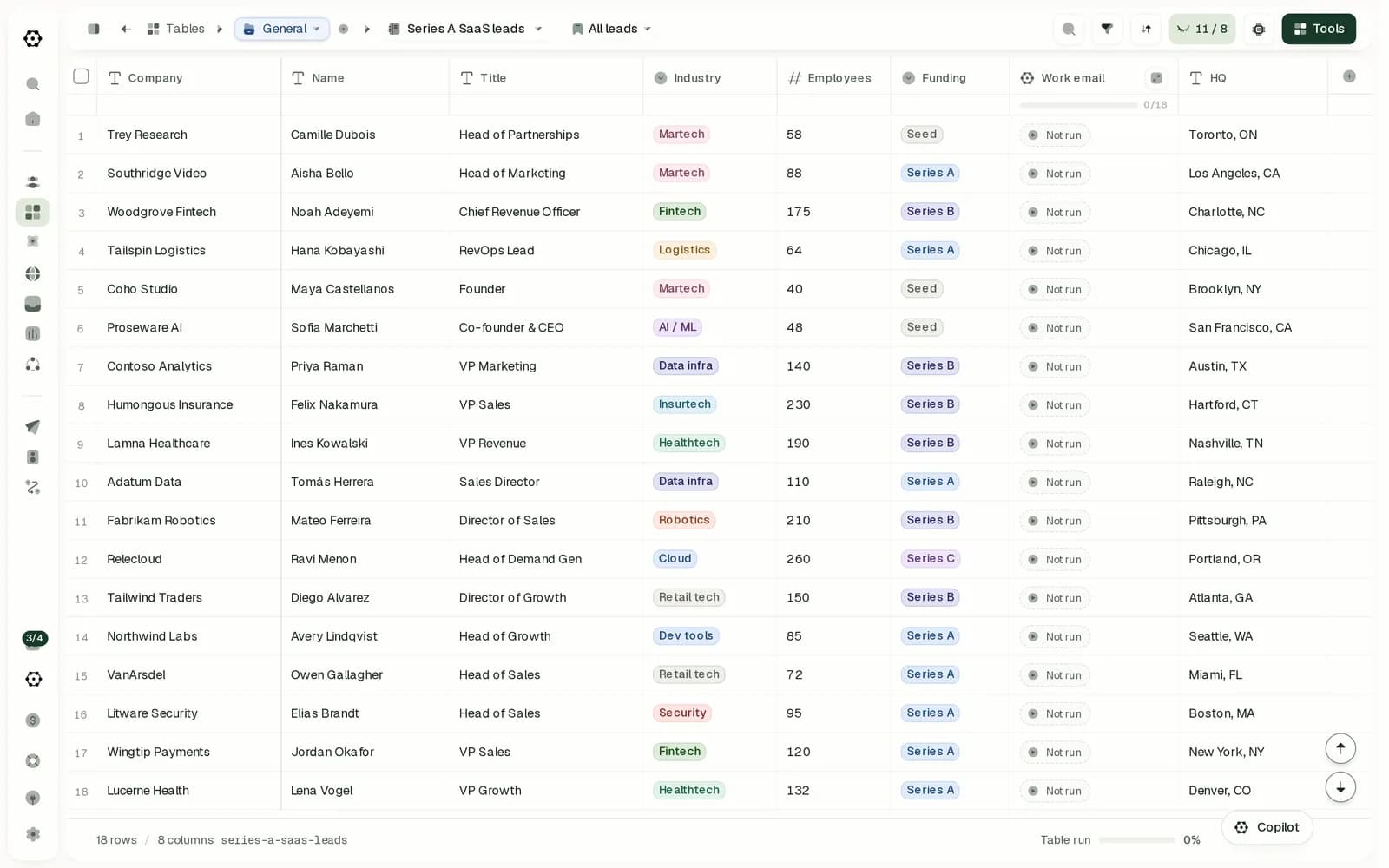
An Oxygen table of 18 leads with company, name, title, industry, employees, funding, a work email column and HQ
A lead list in an Oxygen table. The work email column runs the email waterfall on every row when you start it.

Where does Dripify get its lead data, and how does Oxygen's compare?

Both find work emails on included credits and charge only on a hit. Dripify's Email Finder gives 100 credits a month per seat and verifies each address; its pages name no providers, and phones come only from LinkedIn profiles. Oxygen's waterfalls try 17 email and 13 phone providers on plan credits or your own keys.

Does Dripify track buying signals, and which does Oxygen capture?

Both can start outreach from LinkedIn activity. On Advanced, Dripify rechecks a post's likes and comments every 12 hours, competitors' posts included, and a Sales Navigator search weekly, adding new people to the campaign. Oxygen reads profile viewers, followers and post reactions at no extra cost, adds hiring, funding and job-change searches on credits, and any signal can enroll the lead.

Email, LinkedIn and more channels: Oxygen vs Dripify

How does Dripify protect deliverability, and what does Oxygen include?

Partly. Dripify sends from one connected Gmail or Outlook mailbox, up to 200 emails a day, verifies the emails it finds and stops emailing an address that bounced. Its help asks you to warm up an inbox by hand, and it sells no inboxes and runs no placement tests. Oxygen includes warm-up, inboxes at $4 a month, placement tests, rotation and a bounce pause. See mailboxes.

Does Dripify automate LinkedIn, and what does a sender cost?

Yes, in the cloud, which is what Dripify is built for: invites, messages, Sales Navigator InMail, profile views, endorsements, follows and likes, at $79 a seat a month on Pro with one LinkedIn account per seat. Oxygen runs visits, invites, messages, InMail, follows, likes and comments in the cloud at $34 an account, so 2 senders cost $73.70 a month against $158.

Can one Dripify sequence mix channels, and where do replies land?

One Dripify sequence mixes LinkedIn and email with conditions and pauses a lead who replies on either channel; A/B tests are in beta. LinkedIn chats land in its Smart Inbox, email replies stay in your mailbox, and no AI reply drafts were found. Oxygen adds WhatsApp, tests up to 26 versions of a step and puts every reply in one inbox with AI triage. See sequences.

Can Dripify run many LinkedIn senders, and what does each cost at volume?

Yes, and on account safety it leads Oxygen. Dripify gives every LinkedIn account a dedicated IP in its region, daily limits with random ranges and Activity Control on Advanced; larger teams can ask sales for volume discounts. It does not rotate leads across senders. Oxygen rotates leads across senders with daily and weekly limits, at $34 an account, with no proxy included.

Can Dripify schedule LinkedIn posts?

No. Dripify uses LinkedIn posts as a lead source, collecting the people who liked or commented, but it does not schedule or publish posts. Oxygen schedules LinkedIn and X posts, asks for approval before each one goes out and reads their analytics. See publishing.

CRM and integrations: Oxygen vs Dripify

Does Dripify have a CRM, and how does Oxygen's compare?

A light one. Dripify stores leads as people with notes, tags, custom fields and an activity log, on every plan, but no company records, deals or pipeline were found. Oxygen's CRM holds companies, people, deals and objects you define, with every LinkedIn and email reply on the timeline, free on every plan.

Which CRMs does Dripify sync with, and which does Oxygen?

None both ways. Dripify's native HubSpot integration is in beta and updates contacts that already exist without creating new ones; everything else runs through webhooks, Zapier, Make or its Open API. Oxygen syncs both ways with HubSpot, pushes to Attio and imports from Pipedrive. Neither syncs Salesforce. See Oxygen's integrations.

Can an agency run its clients in Dripify?

Partly. On Advanced, one Dripify account holds a team per client with roles, shared templates and reporting; each member is a separate subscription, and one invoice for 10 or more seats goes through sales. Oxygen gives each client a workspace billed from one plan, with a monthly credit cap per client; client logins are in beta.

Workflows and AI: Oxygen vs Dripify

What can AI do in Dripify, and can coding agents drive it?

Coding agents can reach it: Dripify has an MCP server that lists campaigns, finds leads and uploads up to 1,000 profiles, and an Open API, on Pro and Advanced. In the app, AI writes icebreakers and rewrites drafts. Oxygen adds a Copilot that asks before sends and larger paid steps by default, AI columns over your rows, a research agent that cites its sources, and a CLI.

Pricing and security: Oxygen vs Dripify

How does Dripify pricing compare with Oxygen for a small team?

Oxygen costs less in all three setups. Dripify charges $79 a user a month on Pro, or $59 billed yearly, and each seat holds one LinkedIn account and one mailbox. Oxygen is one plan per workspace paid in credits, with a LinkedIn account at $34 of credits a month. Full prices are on Oxygen pricing.

Is Dripify SOC 2 compliant, and is Oxygen?

Neither has SOC 2, ISO 27001 or SSO. Dripify's trust center describes AES-256 encryption and AWS hosting, and offers its DPA and subprocessor list on request; no public status page was found. Oxygen publishes a DPA and a subprocessor list, which puts it ahead on this row.

Oxygen vs Dripify pricing for 1 and 3 senders

Monthly list prices on monthly billing
SetupOXYGEN a monthDripify a month
1 person on email and LinkedIn$49the $49 plan$79Pro, 1 seat with LinkedIn and email; Advanced ($99) adds Evergreen leads and A/B tests; $59 billed yearly
3 people on email and LinkedIn$118.50the $99 plan plus 1,500 credits in top-ups$237Pro, 3 seats; team management needs the owner on Advanced, $257 a month; $177 billed yearly
A team on email only, 3 inboxes$49the $49 plan$237Pro, 3 seats: one mailbox per seat, and each seat connects a LinkedIn account; $177 billed yearly

Switching from Dripify to Oxygen, or running both

Carries over

  • Your LinkedIn accounts, reconnected in Oxygen's cloud.
  • Leads and custom fields, exported from Dripify as CSV into an Oxygen table or the CRM.
  • Your Gmail or Outlook mailboxes, connected to Oxygen directly.
  • Sequence copy and conditions, rebuilt as Oxygen sequence steps.

Rebuilt in Oxygen

  • Campaign history, statistics and Smart Inbox conversations, which stay in Dripify.
  • The dedicated IP Dripify assigns to each LinkedIn account.

Run both for a while: keep Dripify campaigns running on LinkedIn, and export its leads as CSV into Oxygen for enrichment, email and the CRM. Move each list once its Dripify campaign ends, so nobody gets the same invite twice.

Oxygen vs Dripify FAQ

Is Oxygen cheaper than Dripify?

Yes, in all three setups priced here. One person on email and LinkedIn costs $49 a month on Oxygen against $79 on Dripify Pro, 3 people cost $118.50 against $237, and an email-only team with 3 inboxes costs $49 against $237, because Dripify's pages show one mailbox per seat. Yearly billing cuts Dripify Pro to $59 a seat.

Does Dripify send emails?

Yes, from one connected Gmail or Outlook mailbox per account, in the same sequence as LinkedIn steps, up to 200 emails a day. It verifies the emails it finds and stops emailing a bounced address. Warm-up is manual, and email replies stay in your mailbox. Oxygen adds warm-up, inboxes, placement tests and one inbox for every channel.

Is Dripify a Chrome extension?

No. Dripify runs campaigns in the cloud, so your browser can be closed. A Chrome extension is an optional way to connect your LinkedIn account without sharing your password. Oxygen also runs LinkedIn in the cloud, with no browser extension, at $34 a month per account.

Does Dripify have a free plan?

No. Dripify offers a 7-day trial of its Advanced plan with no credit card, after which campaigns stop until you choose Pro or Advanced. Oxygen has a free workspace with 1,000 credits once, the CRM, tables and workflows, with no time limit; sending needs a paid plan.

Does Dripify integrate with HubSpot or Salesforce?

HubSpot only, and in beta: Dripify updates contacts that already exist in HubSpot and does not create new ones yet. No Salesforce sync was found; other tools connect through webhooks, Zapier, Make or its Open API. Oxygen syncs both ways with HubSpot and has no Salesforce sync either.

Can I move from Dripify to Oxygen?

Yes. Export your leads from Dripify as CSV, import them into an Oxygen table or the CRM, reconnect each LinkedIn account and mailbox in Oxygen, and rebuild your sequences with the same copy. Move a list only after its Dripify campaign has finished, so nobody gets the same invite twice.

When is Dripify the better choice?

When you run LinkedIn outreach from several accounts, want a dedicated IP in each account's region with Activity Control adjusting daily limits, and one mailbox per rep is enough. On most other rows, Oxygen leads, from deliverability and one inbox to the CRM and price.

How we compared Oxygen and Dripify

We make OXYGEN, so read this as an interested comparison. Every comparison on this site scores both products on the same rubric, and a fixed rule decides each row from the facts, never a writer. This page shows the 13 criteria that decide a choice between OXYGEN and Dripify. We also scored tables, extra channels and workflows and left them out; Dripify leads on none of them. Dripify facts come from Dripify's own pages, checked on the dates below; OXYGEN facts and prices come from the product and its live price list.

Sources for Dripify, checked October 17, 2026

Dripify is a trademark of its owner and is not affiliated with OXYGEN. Something out of date? Tell us.