GTM workflows for an AI agent team: shared context and a handoff template
Quick answer
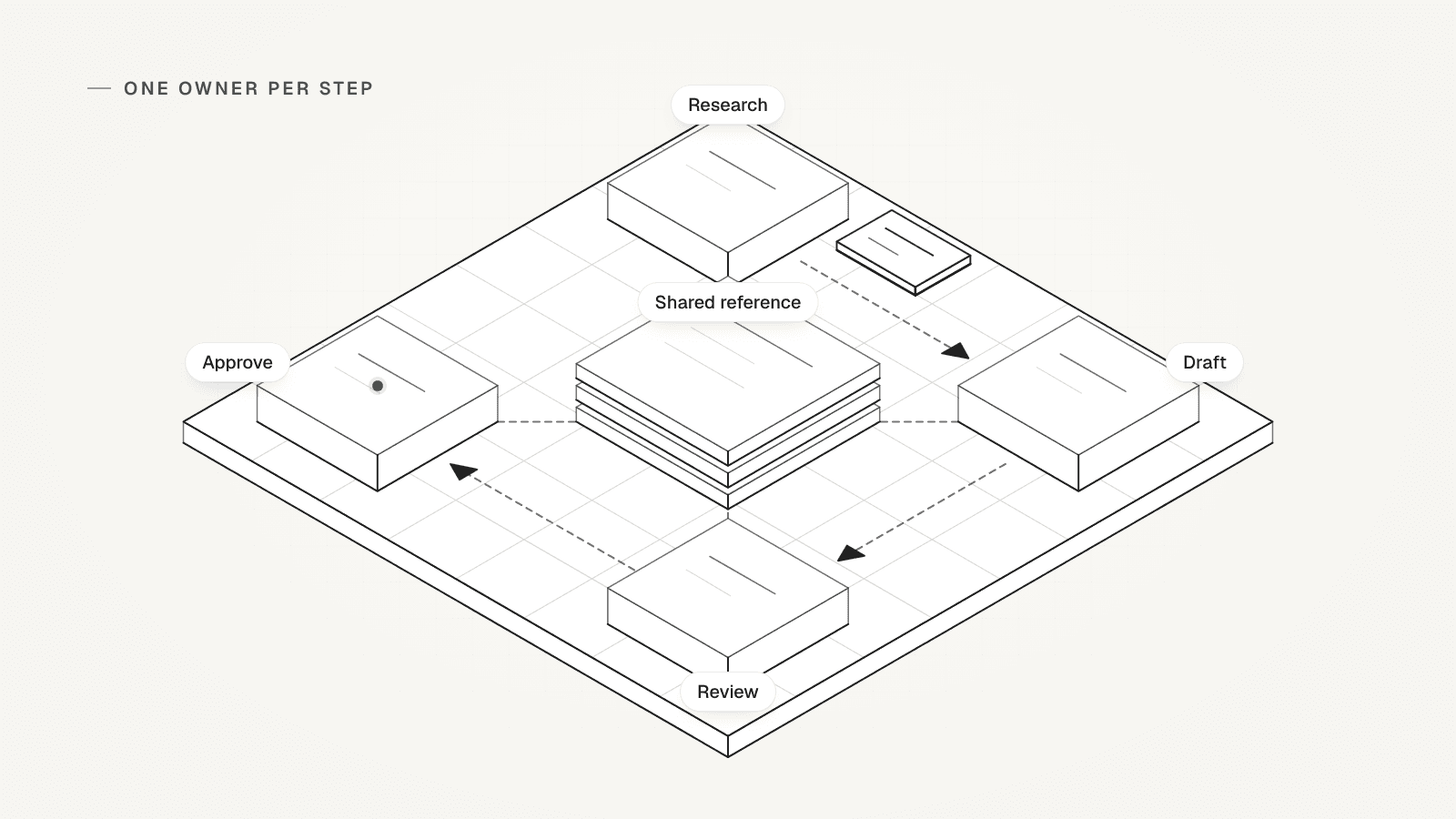
GTM workflows break when several AI agents share go-to-market work but nobody owns each step. Give every agent one job and a written handoff. The handoff names the input, the shared reference, the output and its evidence, where a person reviews, when to stop, and who goes next. Copy the template below, then follow one handoff from account research to a reviewed outbound draft: a first email to a new prospect.
 By Tim Scheuer, Co-founder of Oxygen · Updated October 27, 2026
Why do GTM workflows break when several AI agents share the work?
Because nobody wrote down who owns each step, what it reads and what it hands back. A research agent finds three facts about an account. The drafting agent can't see them, so it searches again or guesses. The draft moves on with no proof behind its claims.
OXYGEN co-founder Tim Scheuer met both halves of this problem. In September 2026 his 40+ skills were "1 big pile". One chat and one job per agent made it "so much easier for me to assign specific things to specific agents". The quality stayed hard: "Where I still struggle is the quality of the output".
So an AI agent team needs three things that roles alone don't give it:
- One owner per step, so two agents never research the same account.
- Evidence that travels with the work, so every claim in a draft has a source.
- A check before each handoff, so weak work stops instead of moving on.
Sources: Tim Scheuer on LinkedIn: 8 GTM employees on Grok Bot (September 2026)
How does Tim Scheuer split GTM work between his agents?
Into five layers, with goals at the top and the GTM platform at the bottom.
He split the work further over time: outbound went from 1 agent to "5 specialised ones", and group chats let them talk. When he tested Grok Bot, "the quality wasn't there" for copy, design and launch videos. Now "Grok Bot orchestrates. Claude Code and Codex do the work with my skills."
This is one founder's setup from September and October 2026. OXYGEN does not ship his 13 roles as ready-made agents. His October 2026 post lists the five layers, and each plays a different part in a handoff:
- "Me. Goals and approvals." The person sets goals and says yes or no to live work.
- "My Chief of Staff routes the work." One of his 13 agents routes; each of the others owns one job.
- "Any agent can send them a unit of work." Claude Code and Codex do the work.
- "Every agent reads from it and writes back to it." His second brain, synced to GitHub, is the shared reference.
- "My agents run my entire GTM in that platform." His GTM stack lives in OXYGEN.
Sources: Tim Scheuer on LinkedIn: the 5-layer org chart (October 2026), Tim Scheuer on LinkedIn: 8 GTM employees on Grok Bot (September 2026)
What goes in a handoff between two GTM agents?
Eight fields, filled in once per handoff and sent with the work. The posts name the layers but not what passes between them, so this card fills that gap.

The habits come from the six prompts in our GTM skills kit. They keep facts apart from guesses, leave unsupported details unknown and wait for approval before paid or live steps. Copy the card from the setup steps below. Each field answers a question the next agent would otherwise guess at:
- Input: what you hand over, such as one account row, and the goal it serves.
- Owner: the one agent or person who does this step. Two owners means nobody owns it.
- Shared reference: the pages to read first, such as the ICP (ideal customer profile), offer and voice guide.
- Expected output: the artifact and its shape, such as a five-field brief or one email draft.
- Evidence: a source for every claim, and each missing fact written as unknown.
- Review or approval: what a person must see, and which actions need their yes, such as a send.
- Stop condition: when to hand back instead of guessing, such as a missing domain.
- Next owner: who gets the output, and where it goes if it fails their check.
What does one handoff from account research to an outbound draft look like?
Here is one, from the goal to a draft a person approves. Acme Software and every fact about it are made up for this page. The goal: a first email to Acme's VP Sales.
The router's card sends Acme's row to the research agent, with the ICP and offer pages as the shared reference. It asks for a brief and stops the step if the domain is missing or Acme is a current customer. The brief that comes back, also made up:
- Fit: possible. Fact 1: it sells software to companies and has 140 staff (company site, LinkedIn page).
- Fact 2: it is hiring two SDRs, the sales development reps who book first meetings (careers page).
- Fact 3: its job posts name HubSpot as its CRM, where customer records live (job post).
- Unknown: contract value, and who owns the outbound tools.
- Angle: new reps need a researched first list. Next owner: the drafting agent.
The handoff, step by step (made-up example)

| Step | Owner | Gets | Hands back | Check before it moves on |
|---|---|---|---|---|
| 1. Route | Router | The goal: a first email to Acme's VP Sales | A card for the research step | One owner and a stop condition named |
| 2. Research | Research agent | Acme's row, the ICP and offer pages | A brief: fit, three facts, two unknowns, one angle | Every fact has a source |
| 3. Draft | Drafting agent | The brief and the voice page | An email draft, each claim tied to a brief fact | No claim beyond the brief |
| 4. Review | Reviewer | The draft and the brief | A pass, or the exact lines to fix | No unknown written as a fact |
| 5. Approve | A person | The draft, its sources and the send plan | A yes, an edit or a no | Nothing goes out without a yes |
What happens when a handoff fails its quality check?
It goes back to the step that can fix it, with the gap named. In the example, the first draft opened with "Congrats on the Series B". The brief had no funding fact, so the reviewer failed the draft and listed that line.

The drafting agent could cut the line or ask research one question. It asked. Research found no funding news in its sources and marked funding unknown. The second draft opened "You're hiring two SDRs [Fact 2]" and passed. Two failed reviews in a row go to a person, never to a third rewrite.
Use the same branches for every failure:
- A claim with no source: back to drafting to cut it, or to research for one fact.
- A missing input, such as no domain: research stops and hands back to the router.
- A stale reference, such as an old offer page: stop, and ask the page's owner to update it.
- Two failed reviews on one piece of work: a person decides what happens next.
How do agents share context without repeating research?
Keep one shared reference that every agent reads before it starts and writes back to when it learns something. That is Tim's fourth layer: his second brain, "synced to GitHub. Every agent reads from it and writes back to it."
Split it in two. Reference pages hold what rarely changes, such as your ICP, offer, voice and do-not-contact rules, and a person approves changes to them. A claim ledger holds what agents find about each account, so the next agent reads it instead of searching again. Tim's team described how it built its company-wide second brain.
Give the ledger one row per claim. Here is the example's hiring fact as a row:
- Claim: Acme is hiring two SDRs.
- Source: the careers page, with the date it was checked.
- Added by: the research agent.
- Status: verified, unknown or wrong. A draft may use verified claims only.
- Used in: the draft line that relies on it, so a reviewer can trace it back.
Sources: Tim Scheuer on LinkedIn: the 5-layer org chart (October 2026)
Where should a person review before anything goes live?
At every step that leaves the workspace or spends real money: a send, a sequence start, a post or a large paid lookup. A sequence start launches an automated series of outreach messages. Tim keeps that layer for himself: "Me. Goals and approvals." For his outbound team, "Nothing goes out without my yes."
Write the boundary into the card, so every agent knows where it stops. Approve a concrete scope: the audience, the copy, the schedule, a send cap and the cost. Our kit's outreach prompt ends the same way: "Keep everything unlaunched until I approve the concrete scope and budget".
Sources: Tim Scheuer on LinkedIn: 8 GTM employees on Grok Bot (September 2026), Tim Scheuer on LinkedIn: the 5-layer org chart (October 2026), OXYGEN GTM skills kit: start with a useful job
Which GTM workflows should an agent team run first?
Start with the six jobs in our GTM skills kit, and chain them so each job's output is the next one's input.
The kit runs inside OXYGEN, or in Claude Code and Codex with an OXYGEN account. The skills have no separate fee; data, enrichment (filling in missing emails and company facts) and sending use your plan's credits. The kit says what a good result holds:
- Decide what to fix first: a sourced snapshot, one proposed bottleneck and the question that could change it.
- Build a target-account list: fit criteria, a preview, the proposed scope and a priced next step.
- Find buyers at those accounts: likely buyer roles, kept apart from people you have verified.
- Research and qualify accounts: evidence behind every grade, with unknowns kept apart. Our lead qualification workflow covers this step.
- Prioritize warm opportunities: fit and relationship evidence and a next action. Engagement alone is not buying intent.
- Prepare an outreach pilot: a plan you can review, with nothing running yet.
Sources: OXYGEN GTM skills kit: start with a useful job, OXYGEN GTM skills kit: what it needs and costs
How do you run these handoffs in OXYGEN?
Give each Oxygent one job, and keep the shared reference in Knowledge. An Oxygent is OXYGEN's in-app AI agent: you add one, name it and tell it its job in your chat with it. None comes with a preset role, so the router, researcher and reviewer here are jobs you write.
One Oxygent can message another, and the answer comes back to the one that asked. It can't message an Oxygent that asked it for the work, and one exchange holds at most 12 messages. So let the router hand out each step and collect each answer. A group chat holds two to six Oxygents with you.
You start the work and set its limits. In the composer's approval menu, Ask for approval makes sends, sequence starts and larger paid steps wait for an approval card. A Workspace Oxygent's chat starts on Auto-approve, and each person's choice covers only their own messages. So everyone who uses an Oxygent that sends or starts sequences should pick Ask for approval in its chat. Where the rest lives, and what it costs:
- Shared reference: Knowledge holds your company profile, ICP and offer. Name the pages each Oxygent should read first.
- Voice: pinned voice, brand and positioning pages ground AI-written copy, and a change to one waits as a proposal for approval.
- Team memory: what the team asks an Oxygent to remember is a Knowledge page that every chat with it reads.
- Cost: an Oxygent's model use bills workspace credits unless you connect your own AI model key, and paid steps bill as usual.
Set up handoffs for your GTM agent team
Copy the handoff card into every handoff
Fill one card per step and send it with the work.
HANDOFF CARD Input: [what you hand over] for [goal] Owner: [one agent or person] Shared reference: [pages to read first] Expected output: [artifact and format] Evidence: [a source per claim; unknowns listed] Review or approval: [what a person sees; what needs a yes] Stop condition: [when to hand back] Next owner: [who gets it; where a failed check goes]Add the stop rule to every agent
Paste it into each agent's instructions, so a gap stops the work.
STOP RULE If a fact you need is missing or a check fails, stop. Hand the work back to [owner] with the gap named. Do not guess.Start a claim ledger for each account
Fill one row per claim and keep it with the account.
CLAIM LEDGER ROW
Claim: [one fact about the account]
Source: [page or record]
Checked on: [date]
Added by: [agent or person]
Status: [verified, unknown or wrong]
Used in: [the draft line that relies on it]
Role instructions to paste into each agent
Router: turn a goal into handoff cards
You route work and do none of it. For [goal], name one owner per step and write a handoff card for each step. Ask me one question if the goal is unclear.What you getOne card per step, so no two agents research the same account.
Research agent: return a sourced brief
You own account research for [account]. Read [ICP page] and [offer page] first. Return a brief: fit verdict, three sourced facts, unknowns, one angle. Use free reads only. If the domain is missing or a hard exclusion applies, stop and hand back.What you getA brief the next agent can use without searching again, or a stop that names the gap.
Drafting agent: write from the brief only
You own the first draft to [person] at [account]. Use only facts in the brief and [voice page], and tag each claim with its fact. If the angle needs a fact the brief lacks, ask research one question. Do not send, enroll or schedule anything.What you getA draft where every claim points at a brief fact, or one question back to research.
Reviewer: check the draft before a person sees it
Check the draft against its brief. Fail any claim with no fact behind it and any unknown written as fact. List the exact lines to fix. After two failed reviews, hand the work to [person].What you getA pass with the checked claims, or a fail the drafting agent can act on.
What this template does not do
- The roles here are Tim's personal setup and a made-up example. OXYGEN does not ship them as ready-made agents.
- A handoff card checks evidence. It cannot make copy good: in September, Tim still went back to other models for copy and design.
- We have not measured the time or money this template saves.
Frequently asked questions
What is a GTM workflow?
A GTM workflow is a repeatable chain of go-to-market steps that finds, qualifies and contacts buyers. Common ones are list building, account research, outreach drafts and reply handling. Each step hands its output to the next, so the handoffs decide whether the chain holds.
How many AI agents does a GTM team need?
As many as you can write separate handoff cards for. Split a job when part of it needs its own pages or review; keep two jobs in one agent when they share both. Tim Scheuer went from 8 agents in September 2026 to 13 in October, and every split adds a handoff.
Should AI agents send outreach without approval?
For a sales-led B2B (business-to-business) team, keep a person's yes before sends, sequence starts and larger paid steps. Tim's rule is "Nothing goes out without my yes". In OXYGEN, pick Ask for approval in the composer's approval menu, in the chat of every Oxygent that can send or start a sequence. A Workspace Oxygent's chat starts on Auto-approve, and each person sets this for their own messages.
Does OXYGEN ship these agent roles?
No. The router, researcher, drafter and reviewer here are jobs you write. In OXYGEN you add an Oxygent, its in-app AI agent, and tell it its job in your chat with it.
Can I use this template with Claude Code, Codex or Grok Bot?
Yes. The card and the role instructions are plain text, so any agent can follow them. To run the work in OXYGEN from Claude Code or Codex, install OXYGEN's command-line tool and sign in, then install the GTM skills kit. From Grok Bot, connect OXYGEN as a custom MCP server (MCP is the standard that lets an AI assistant use other tools).
Related
Sources
- Tim Scheuer on LinkedIn: 8 GTM employees on Grok Bot (September 2026), checked October 27, 2026
- Tim Scheuer on LinkedIn: the 5-layer org chart (October 2026), checked October 27, 2026
- OXYGEN GTM skills kit: start with a useful job, checked October 27, 2026
- OXYGEN GTM skills kit: what it needs and costs, checked October 27, 2026
Updated October 27, 2026. OXYGEN's own prices and limits come from the product and its live price list. The other products named here are trademarks of their owners and are not affiliated with OXYGEN. Something out of date? Tell us.